Thanks @Ferudun for pointing out that all the many screens you have dealt with work with modern browser.
Regardless of whether the browser is out of date - we would like to support as much as possible (within reason). As far as I know these are the options available. It is really just pointer (modern) or touch (older) and then CreateJS has logic to decide which one to use.
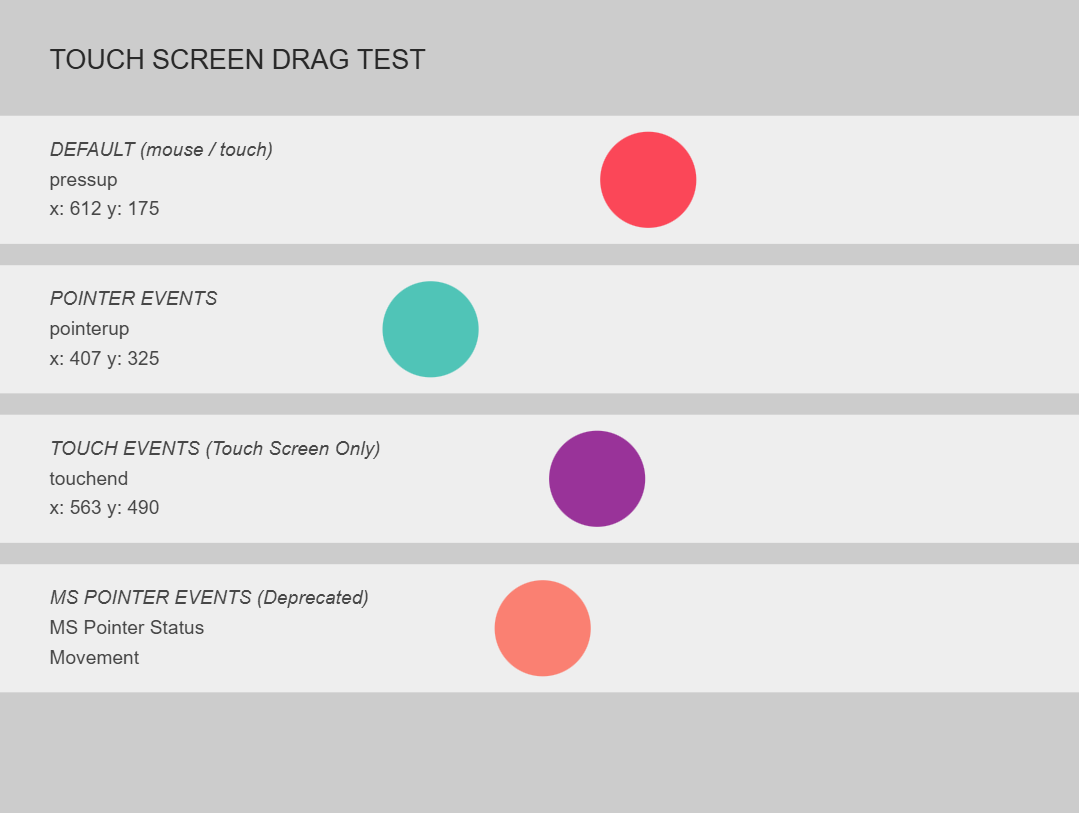
The last three circles below use pointer, touch and mspointer events independent of CreateJS and ZIM. We did not get the mspointer events to work on our machine, but it is possible that an older browser might recognize this and not regular pointer events.
We would like to know what it says for their DEFAULT - mouse / touch or pointer or mspointer. Also which drags work if any. And their browser, version, OS and screen.
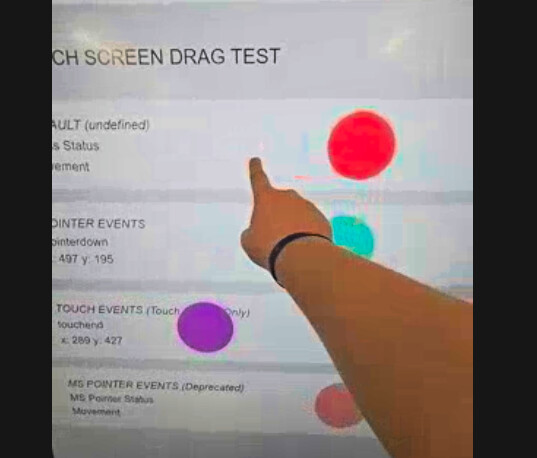
I tested the example you sent on the interactive whiteboard. Except for MS Pointer, the others work. As I mentioned before, it's necessary to test on older versions of the browsers. I will try installing and testing older versions of Chrome on the interactive whiteboard.
One of the teachers who has reported that some of his interactive boards work and others don’t for Topmarks' games, has said that Chrome is set to update automatically and version 143 installed.
His school has Viewsonic boards.
He is yet to test the page but has committed to do so when time allows… teachers are obviously busy people!
Now that teachers are back to school after the Christmas break I'm looking into drop and drop again, as the "drag and drop isn't working" emails are coming in again.
I notice that the test page at ZIM - Touch Screen Drag Test - Code Creativity is currently broken. Would it be possible to get it working again before I start sending it out again please?
Oh - sorry about that! Fixed. We adjusted CreateJS to be 1.5 and found ourselves editing the 1.5.1 folder by accident so we deleted it locally. It seems like my VS Code FTP extension then deleted it from the server... we had never released 1.5.1 into production so forgot about our test there. Fixed. Yes - let's get this figured out.
@Abstract My suggestion is to send the user experiencing the problem two links: one example created with ZIM, and one drag example created with another canvas library. The user should test both. If the problem only occurs with the ZIM example, then we can assume the issue is with ZIM Touch.
It's a different school, but they do have Edge and Chrome up to date. This school has some screens that do work (Viewsonic 52 series) and some that don't (Viewsonic 53 series). I've asked for the same test to be conducted on the working screens as well for comparison, but haven't got any results yet.
Okay - just got back from a long day teaching... should be able to do some digging tomorrow. It is a sensitive area as in it affects all mouse / touch interactions and the createjs code is complicated.
But I think we have touch events in there... it is just the test we have is saying use something else for that board and browser. We just need to tweak the test a little so it points to touch... I will try and adjust on a test version of createjs and then make another drag app - perhaps this time capturing the parts of the test but also trying to ensure that we get to test ZIM with the touch coming through from CreateJS.
For this drag test, we are using a test version of CreateJS where we store in a property createjs.touchType the touch code that CreateJS thinks we should use. We then read that variable into the brackets after the DEFAULT heading. Note that in the brackets is undefined. So we are not even getting to an expected type. This is why ZIM is not working.
In CreateJS Touch.enable() there are two initial tests:
// test 1
if (!stage || !stage.canvas || !Touch.isSupported()) { return false; }
// There is a stage and a canvas so possibly Touch.isSupported() is false
// test 2
// both the Touch._ methods in here would populate the touchType property
// so it is possible that neither are running so neither are called
// but most likely, since, the touchstart is working in the video
// the 'ontouchstart' in window would be true - and presumably the Edge detect
// so I bet it is not even getting here
if ('ontouchstart' in window || createjs.BrowserDetect.isChrome || createjs.BrowserDetect.isEdge || createjs.BrowserDetect.isFirefox) {
	Touch._enable(stage);
} else if (window.PointerEvent || window.MSPointerEvent) {
	Touch._IE_enable(stage);
}
So assuming the issue is the first test... here is Touch.isSupported()