import { mount } from 'svelte'
import App from './App.svelte'
const app = mount(App, {
	target: document.getElementById('app')!,
})
export default app
Btw: If I enter "import ZIM from 'zimjs';" the error "Module '...svelte-ZIM-ts/node_modules/zimjs/ts-src/typings/ZIM/index"' has no default export.
Now the main point of this message:
I want to use STYLE in Typescript.
In this example https://zimjs.com/style.html style was set with STYLE = {} after ready. STYLE = {} after ready in the template svelte-ZIM-ts.zip does not work.
I think there are two parts to this message - maybe the first part relating to a previous message. Is the first part okay? Or is there something we can do to make Svelte installation and ZIM import work easier?
For the second part - are you using the ZIM namespace all along so ZIM.Frame() etc. In that case ZIM.STYLE make make sense. If you do not need the namespace for the others, then maybe we did not get STYLE on the the zimplify... etc. but I think we did. Let us know. Cheers.
For the first part: I use svelte-ZIM-ts.zip from here: TypeScript Typings need Adjustment - #11 by Abstract
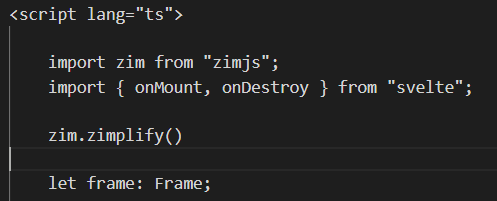
In VSCodium (the same as VSCode but without telemtry). I open App.svelte and if I enter "import ZIM from 'zimjs';" VSCodium says: "Module '...svelte-ZIM-ts/node_modules/zimjs/ts-src/typings/ZIM/index"' has no default export."
This brings us to the second part: Only if I enter "import ZIM from 'zimjs'"; I can enter "ZIM.STYLE = {}". I always try to avoid using a namespace. If I want to use STYLE without namespace it dosen't work: VSCodium says: "Cannot find name 'STYLE'."
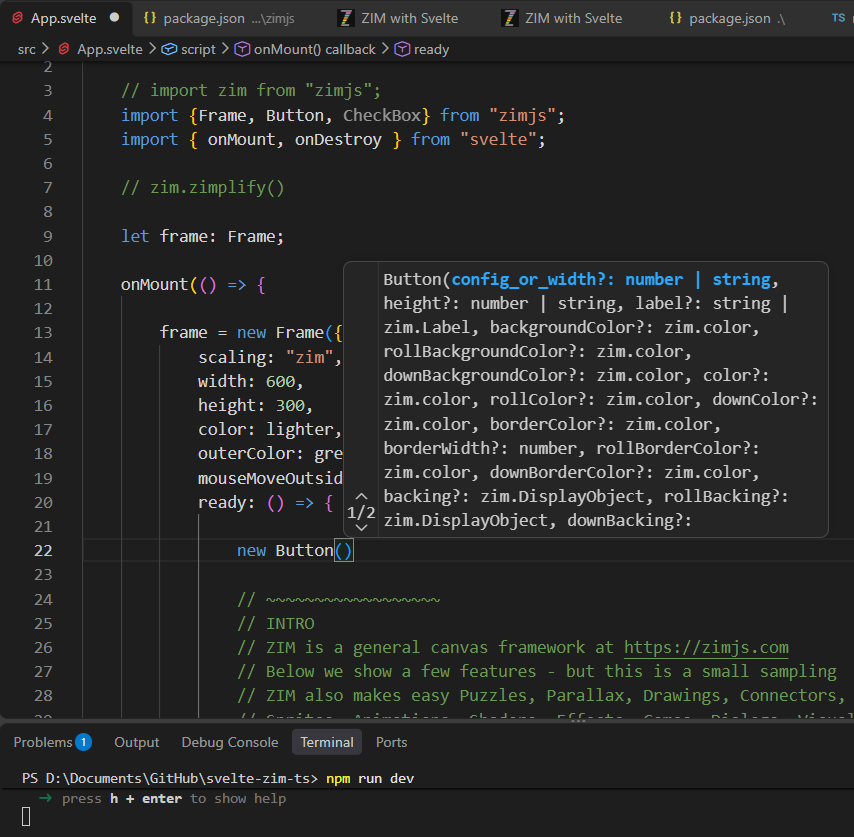
But you can find Button() and Frame(), etc, without the namespace. Okay, then we need to fix that so we can use STYLE without the namespace. As a matter of fact... all our constants - AUTO, LEFT, etc. should be able to be used without the namespace when zon=true (forced namespace). What about Ticker? Can you use Ticker.add(()=>{}); in your setup?
I did not realize you were trying the import in the ts file. I will check that out next - but that aside, you can use: ZIM.zimplify() to avoid using namespaces.
STYLE works with ZIM.STYLE = {}. You don't have to make it available without a namespace. The first part confuses me and I don't know if this message will have any impact.
Ticker works: If I enter Ticker it comes automatically "import {Ticker} from 'zimjs/ts-src/typings/ZIM/index';" or "import {Ticker} from 'zimjs';"
Here is an AI analysis. So we can go and adjust our package, etc. Will have a look now.
Looking at the package.json, the reason TypeScript threw that error when importing zimjs into a .ts file becomes clear.
1. The Typings Path in package.json
In package.json:
"types": "./ts-src/typings/zim"
Modern TypeScript (especially in Vite, SvelteKit, and TS 5+) requires an explicit pointer to the .d.ts file. When given just a directory path, TypeScript's resolver fails and reports that the module does not exist or has no exports.
The Fix in package.json:
"types": "./ts-src/typings/zim/index.d.ts"
(or wherever index.d.ts is located inside that folder).
2. Is importing ZIM in a .ts file standard practice?
In main.ts (Svelte entry point): No, because main.ts only attaches Svelte to the DOM (new App(...)). ZIM is not called there.
In general TypeScript files (.ts / .svelte):Yes! Developers writing separate TypeScript files (like game.ts, scene.ts, or utility files) will naturally write:
import zim from "zimjs";
to get full TypeScript autocomplete, parameter hints, and type checking for ZIM classes and methods.
3. Making import zim from "zimjs" Work Out-of-the-Box
To make sure any TypeScript user can import ZIM seamlessly:
In package.json, change:
"types": "./ts-src/typings/zim/index.d.ts"
In ts-src/typings/zim/index.d.ts, ensure there is a default module export at the bottom:
export default zim;
With index.d.ts explicitly targeted in package.json, any developer can run npm i zimjs and immediately write import zim from "zimjs" in any .ts or .svelte file with full type support and zero configuration hurdles.
With ZIM.zimplify() and enter STYLE = {} I get the message:
"Cannot find name 'STYLE'. Did you mean '$styles'?"
But I can help myself with ZIM.STYLE = {}
Okay - it works for me. Strange. You did use lowercase ZIM and put it in place like the screenshot?
We just updated the ZIM package to 20.1.2 and perhaps that will let you import into your typings, but I don't think that should be needed. Let us know when you get a chance.
yes. Okay - we reverted and posted 20.1.3 so we can see the individual classes. It might mean we are back to not importing the typings in the main.ts but you should not have to. We see typings, etc. and it runs fine.
Okay - I think we have it now. We have published new templates with better instructions:
// OPTION 1: Named imports (Standard TypeScript / Tree-shaking)
import { Frame, Circle, Dial, Emitter, Pen, MotionController, series, LabelOnArc } from "zimjs"

// OPTION 2: Classic ZIM (Global / No namespace, no individual imports)
// import * as zim from "zimjs"
// zim.zimplify() // makes Frame, Circle, etc. available globally

// OPTION 3: Namespaced ZIM (Clean separation)
// import * as zim from "zimjs"
// new zim.Frame(...); new zim.Circle(...)
You may want to use option 2
import * as ZIM from "zimjs";
and then ZIM.zimplify() to avoid namespace and still get typings! Woot. Hopefully that worked. It worked for specific classes and using zimplify - we got typings for each now.
Thanks for testing those options! We put the ZIM import and code in App.svelte, not main.ts
In Svelte, main.ts is only used to mount your root Svelte app. Canvas and DOM elements created by ZIM should live inside App.svelte within Svelte's onMount function so that the DOM is ready.
Option 1 (Named imports) gives you full type safety, auto-complete, and tree-shaking:
import { Frame, Button, Circle } from "zimjs";
Option 2 gave TS errors:** zimplify() injects globals at runtime in the browser. Because TypeScript checks your code before it runs, it doesn't know Button exists globally yet and flags Cannot find name 'Button'.
Keep your src/main.ts standard:
import App from './App.svelte';

const app = new App({
  target: document.getElementById('app')!,
});

export default app;
And put your ZIM code in src/App.svelte :
<script lang="ts">
  import { onMount } from "svelte";
  import { Frame, Circle, Button} from "zimjs";

  let holder: HTMLDivElement;

  onMount(() => {
    // Create the Frame inside Svelte's lifecycle
    const frame = new Frame({
      scaling: FIT,
      width: 1024,
      height: 768,
      color: light,
      outerColor: dark,
      ready: ready
    });

    function ready() {
      // F = frame, S = stage, W = 1024, H = 768
      new Circle(100, purple)
        .center()
        .drag();

      new Button({ label: "CLICK" })
        .pos(50, 50)
        .tap(() => {
          zog("Button tapped!");
        });
    }

    return () => {
      frame.dispose(); // Clean up if Svelte unmounts component
    };
  });
</script>

<main>
  <div bind:this={holder}></div>
</main>

<style>
  main {
    width: 100vw;
    height: 100vh;
    overflow: hidden;
  }
</style>
Oh - sorry - those are constants and are not exported. So the global constants are global regardless. Just remove them. I forgot. Just edited the code above.