Vector check shape

Hi,

For my UI I would like to be able to add a check vector icon

But I would like to add it as a vector to my code and preferably not by downloading a file. This shape is rather easy to draw.

I will want to change the color of the shape on runtime, but not the form.

What should I best do to be able to do this? These seem like quite simple beziers to me, but I have to idea how to add them to a container and fill ?

Kind regards,
Bart

oops. ChatGPT helped me out a lot here. I should have searched a little better.

It suggests this kind of code

const holder = new Container(400, 300).center(); // the container
            holder.drag(); // optional, just to prove it's a container

            const s = new Shape().addTo(holder);
            s.x = 200;
            s.y = 150;

            const g = s.graphics;

            // IMPORTANT: set fill BEFORE drawing, and close each path
            g.f("blue")

                // --- Curve 1 (closed bezier blob) ---
                .mt(-80, 0)
                .bt(-80, -60, -10, -70, 0, -20)
                .bt(10, -70, 80, -60, 80, 0)
                .bt(80, 60, 10, 70, 0, 20)
                .bt(-10, 70, -80, 60, -80, 0)
                .cp()

                // --- Curve 2 (another closed bezier blob) ---
                .mt(-10, 30)
                .bt(-40, 0, -30, -40, 0, -30)
                .bt(30, -40, 40, 0, 10, 30)
                .cp();

I suppose this is the way to go? but I can't see bezier handles this way. Unless I miss something and there is a better way ?

If you have the SVG path parameter then pass that to the ZIM Blob as its points. Or draw it with our tool at ZIM Paths - Interactive Path Animations - you can upload a picture to trace it. Then look at the code and use the path there as points of a Blob. Set the Blob interactive to false and add it your buttons. Change the color with blob.color = red, etc.

If I draw the shape in Illustrator and save as .svg, then I get this

<?xml version="1.0" encoding="UTF-8"?>
<svg id="Layer_2" data-name="Layer 2" xmlns="http://www.w3.org/2000/svg" viewBox="0 0 389.42 317.8">
  <defs>
    <style>
      .cls-1 {
        fill: #429b46;
      }
    </style>
  </defs>
  <path class="cls-1" d="M6.49,164.88c-28.08-49.07,40.29-115.38,101.94-66.72,24.22,23.78,41.39,62.53,46.24,68.04s8.59-44.26,99.08-132.33c92.48-94.24,185.83,31.49,104.59,94.46-78.39,62.75-168.88,163.16-168.88,163.16-45.47,46.06-66.88,17.76-67.36,17.19,0,0,0,0-.01-.01C43.92,214.64,28.29,202.97,6.49,164.88Z"/>
</svg>

The trace tool does this

[[-8.2,108.3,0,0,74.5,-87.2,-30,39.9,"free"],[-75.5,112,0,0,20.9,24.7,-20.9,-24.7,"mirror"],[-141.1,14.4,-7.8,2.1,13.1,32.2,-28.8,-27.9,"mirror"],[-77.3,-34.3,0,0,-47,-39,21.6,17.9],[-39.2,16.7,0,0,-23.7,-35.5,17.2,-25.4,"free"],[50.5,-90.5,-1.1,-0.7,-46.4,38.1,44.3,-39.6,"mirror"],[118.2,-12.4,0,0,60.3,-62,-29.8,30.4,"free"]]

I must say I would prefer to work with illustrator, but what should be the next step then Dr Abstract?

There are 7 points in the illustrator version, but the buildup looks a lot different? Unless there is a easy way to convert the path info to data the blob understands ?

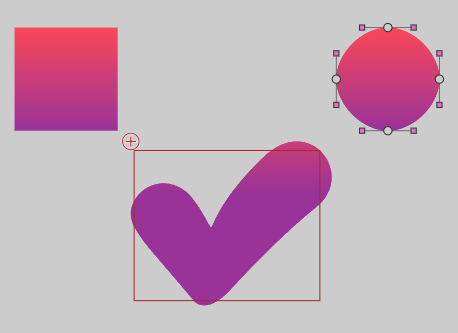
Good - it works with your illustrator points:

const points = "M6.49,164.88c-28.08-49.07,40.29-115.38,101.94-66.72,24.22,23.78,41.39,62.53,46.24,68.04s8.59-44.26,99.08-132.33c92.48-94.24,185.83,31.49,104.59,94.46-78.39,62.75-168.88,163.16-168.88,163.16-45.47,46.06-66.88,17.76-67.36,17.19,0,0,0,0-.01-.01C43.92,214.64,28.29,202.97,6.49,164.88Z";

new Blob({color:red, points:points, interactive:false})
    .center().hov(purple);
1 Like

Oh wow thats nce[quote="Abstract, post:5, topic:4567"]

const points = "M6.49,164.88c-28.08-49.07,40.29-115.38,101.94-66.72,24.22,23.78,41.39,62.53,46.24,68.04s8.59-44.26,99.08-132.33c92.48-94.24,185.83,31.49,104.59,94.46-78.39,62.75-168.88,163.16-168.88,163.16-45.47,46.06-66.88,17.76-67.36,17.19,0,0,0,0-.01-.01C43.92,214.64,28.29,202.97,6.49,164.88Z";

new Blob({color:red, points:points, interactive:false})
    .center().hov(purple);

[/quote]

Wow, thats indeed nice and simple. is it also possible to have the fill color to be a gradient from yellow on top to red on bottom ?

2 Likes

You can... not sure why it is not quite working properly

image

Probably can adjust... let me give it a go.

There... just adjusted the angle

F.color = black

const points = "M6.49,164.88c-28.08-49.07,40.29-115.38,101.94-66.72,24.22,23.78,41.39,62.53,46.24,68.04s8.59-44.26,99.08-132.33c92.48-94.24,185.83,31.49,104.59,94.46-78.39,62.75-168.88,163.16-168.88,163.16-45.47,46.06-66.88,17.76-67.36,17.19,0,0,0,0-.01-.01C43.92,214.64,28.29,202.97,6.49,164.88Z";

new Blob({
    color:new GradientColor([red,purple],[0,1],120), 
    points:points, 
    interactive:false
})
    .center()
    .hov(new GradientColor([green,orange],[0,1],120));

OMG thank you so much.
This is extremely efficient and I think I will rewrite my GUI to use this instead of 9-sliced png-sprites. It uses a lot less space and they do look sharper. Thank you soo much.

2 Likes