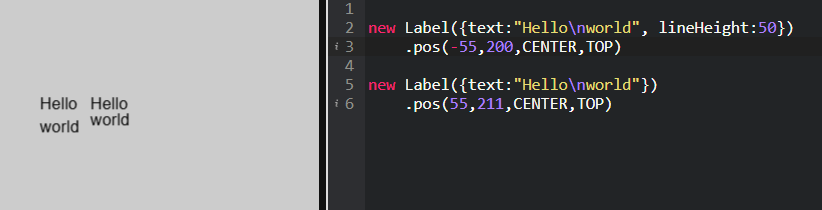
Oh sorry!!! I forgot that we changed the module version to just CreateJS 1.5 - we had updated 1.5.1. So can you please check again now with a refresh.
Here is what we see:
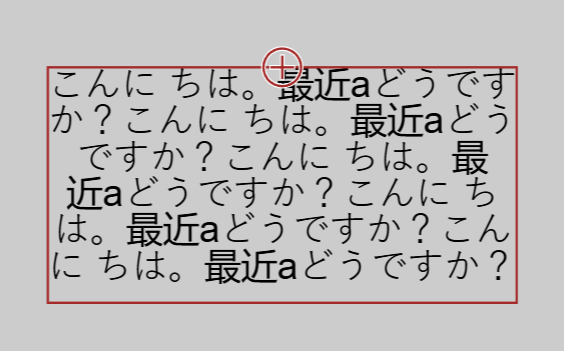
Your test with normal lineHeight looks like this:
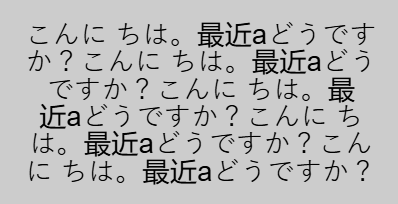
Oh sorry!!! I forgot that we changed the module version to just CreateJS 1.5 - we had updated 1.5.1. So can you please check again now with a refresh.
Here is what we see:
Your test with normal lineHeight looks like this:
It works! 
Thank you very much!
You're the best!
If I had one suggestion, it would be nice if there was another lineHeight feature.
If you have free time, check this code and watch the video clip attached!
<!-- zimjs.com - JavaScript Canvas Framework -->
<script type="module">

    import zim from "https://zimjs.org/cdn/019/zim";

    new Frame(FULL, null, null, light, dark, ready);

    function ready() {
        let A; let B; let C;

        function test (){
            if (A != null) {
                A.removeFrom();
                A = null;
            }
            if (B != null) {
                B.removeFrom();
                B = null;
            }
            if (C != null) {
                C.removeFrom();
                C = null;
            }

            A = new Label({
                text: "こんに ちは。最近aどうですか?こんに ちは。最近aどうですか?こんに ちは。最近aどうですか?こんに ちは。最近aどうですか?こんに ちは。最近aどうですか?",
                labelWidth: W * 0.7,
                labelHeight: 150,
                lineHeight: 35,
                align: "center",
                splitWords: true,
            }).center(S).mov(0, -300)

            B = generateText({
                text: "こんに ちは。最近aどうですか?こんに ちは。最近aどうですか?こんに ちは。最近aどうですか?こんに ちは。最近aどうですか?こんに ちは。最近aどうですか?",
                maxWidth: W * 0.7,
                maxHeight: 150,
                lineHeightRatio: 1.4,
                textAlign: "center",
            }).center(S).mov(0, 0)

            C = generateText({
                text: "Happy new year! Happy new Safawoiefawigkso. Happy new year! Happy new Safawoiefawigkso. Happy new year! Happy new Safawoiefawigkso.",
                maxWidth: W * 0.7,
                maxHeight: 150,
                lineHeightRatio: 1.4,
                textAlign: "center",
                splitByCharacter: false,
            }).center(S).mov(0, 300)
        }


        test()

        F.on("resize", () => {
            test()
        });


        function generateText({
            text = "Text",
            maxWidth = 300,
            maxHeight = 300,
            fontName,
            color,
            maxFontSize = 80,
            lineHeightRatio = 1.4,
            textAlign = "center",
            splitByCharacter = true,
            minFontSize = 10
        }) {
            // Create the ZIM Label
            const label = new Label({
                text: "",
                size: maxFontSize,
                font: fontName,
                color: color
            });

            // Access the internal CreateJS Text object
            const internalText = label.label;
            internalText.textAlign = textAlign;
            internalText.textBaseline = "middle";

            // Create a dummy Text object for measuring width/height
            const measureObj = new createjs.Text("", "", color);

            // Function: Wrap text by character (splits character by character)
            function wrapByCharacter(measurer, rawString, limitWidth) {
                const lines = [];
                let currentLine = "";

                for (let i = 0; i < rawString.length; i++) {
                    const char = rawString[i];
                    measurer.text = currentLine + char;

                    // Check if adding the character exceeds the width
                    if (currentLine !== "" && measurer.getMeasuredWidth() > limitWidth) {
                        lines.push(currentLine);
                        currentLine = char;
                    } else {
                        currentLine += char;
                    }
                }
                if (currentLine !== "") lines.push(currentLine);
                return lines;
            }

            // Function: Wrap text by word (keeps words intact unless too long)
            function wrapByWord(measurer, rawString, limitWidth) {
                // Split by whitespace but keep the token logic
                const tokens = rawString.match(/\S+\s*/g) || [""];
                const lines = [];
                let currentLine = "";

                for (const rawToken of tokens) {
                    const token = rawToken;
                    measurer.text = currentLine + token;

                    // Check if adding the token exceeds the width
                    if (currentLine !== "" && measurer.getMeasuredWidth() > limitWidth) {
                        // Push the current line (trim trailing spaces)
                        lines.push(currentLine.replace(/\s+$/g, ""));

                        // Handle the next token (remove leading spaces)
                        let nextToken = token.replace(/^\s+/g, "");
                        measurer.text = nextToken;

                        // If the single token itself is wider than the limit, force character split
                        if (nextToken !== "" && measurer.getMeasuredWidth() > limitWidth) {
                            const charLines = wrapByCharacter(measurer, nextToken, limitWidth);
                            if (charLines.length > 1) {
                                lines.push(...charLines.slice(0, -1));
                                currentLine = charLines[charLines.length - 1] || "";
                            } else {
                                currentLine = charLines[0] || "";
                            }
                        } else {
                            currentLine = nextToken;
                        }
                    } else {
                        currentLine += token;
                    }
                }

                if (currentLine !== "") lines.push(currentLine.replace(/\s+$/g, ""));
                return lines;
            }

            // Function: Calculate line breaks and total height
            function calculateLayout(measurer, rawString, limitWidth, lineHeight, isCharSplit) {
                const lines = isCharSplit
                    ? wrapByCharacter(measurer, rawString, limitWidth)
                    : wrapByWord(measurer, rawString, limitWidth);

                return {
                    wrappedText: lines.join("\n"),
                    totalHeight: lines.length * lineHeight
                };
            }

            // Try font sizes from largest to smallest
            for (let size = maxFontSize; size >= minFontSize; size--) {
                const fontString = `${size}px ${fontName}`;
                const currentLineHeight = size * lineHeightRatio;

                measureObj.font = fontString;

                const result = calculateLayout(measureObj, text, maxWidth, currentLineHeight, splitByCharacter);

                if (result.totalHeight <= maxHeight) {
                    // Apply successful settings
                    internalText.font = fontString;
                    internalText.lineHeight = currentLineHeight;
                    label.text = result.wrappedText;

                    // Horizontal Alignment
                    if (textAlign === "center") {
                        label.x = maxWidth / 2;
                    } else if (textAlign === "right") {
                        label.x = maxWidth;
                    } else {
                        label.x = 0;
                    }

                    // Vertical Alignment (Center)
                    label.y = (maxHeight - result.totalHeight) / 2;

                    return label;
                }
            }

            // If text doesn't fit even at min size, enforce minimum settings
            internalText.font = `${minFontSize}px ${fontName}`;
            internalText.lineHeight = minFontSize * lineHeightRatio;
            label.text = text;

            if (textAlign === "center") {
                label.x = maxWidth / 2;
            } else if (textAlign === "right") {
                label.x = maxWidth;
            } else {
                label.x = 0;
            }
            label.y = 0;

            return label;
        }

    } // end ready

</script>
<meta name="viewport" content="width=device-width, user-scalable=no" />
And here is the generateSingleLineText function made by AI!
This is useful when you want to change the font size without wrapping words.
Sorry if it is already implemented. (I couldn't find it.)
<!-- zimjs.com - JavaScript Canvas Framework -->
<script type="module">

    import zim from "https://zimjs.org/cdn/019/zim";

    new Frame(FIT, 1000, 1000, light, dark, ready);

    function ready() {
        let A; let B; let C;

        function test (){
            if (A != null) {
                A.removeFrom();
                A = null;
            }
            if (B != null) {
                B.removeFrom();
                B = null;
            }
            if (C != null) {
                C.removeFrom();
                C = null;
            }


            A = new Label({
                text: "Happy new year! Happy new year! Happy new year!",
                lineWidth: 500,
                align: "center",
            }).center(S).mov(0, -300)

             B = generateSingleLineText({
                text: "Happy new year! Happy new year! Happy new year!",
                width: 500,
                color: dark,
                align: "center"
            }).center(S).mov(0, 0)
        }

        test()

        function generateSingleLineText({
            text = "Text",
            width = 600,
            fontName,
            color,
            maxFontSize = 80,
            align = "center",
            minFontSize = 10
        }) {
            // Create ZIM Label
            const label = new Label({
                text: text,
                size: maxFontSize,
                font: fontName,
                color: color
            });

            // Access the internal CreateJS Text object
            const innerText = label.label;
            innerText.textAlign = align;
            innerText.textBaseline = "middle";

            // CreateJS Text for measurement
            const measureText = new createjs.Text(text, "", color);

            // Try font sizes from largest to smallest
            for (let size = maxFontSize; size >= minFontSize; size--) {
                const fontString = `${size}px ${fontName}`;
                measureText.font = fontString;

                const measuredWidth = measureText.getMeasuredWidth();

                if (measuredWidth <= width) {
                    innerText.font = fontString;
                    label.text = text;

                    // Horizontal alignment
                    if (align === "center") {
                        label.x = width / 2;
                    } else if (align === "right") {
                        label.x = width;
                    } else {
                        label.x = 0;
                    }

                    label.y = 0;

                    return label;
                }
            }

            // If no size fits, display at minimum size
            innerText.font = `${minFontSize}px ${fontName}`;
            label.text = text;

            if (align === "center") {
                label.x = width / 2;
            } else if (align === "right") {
                label.x = width;
            } else {
                label.x = 0;
            }
            label.y = 0;

            return label;
        }

    } // end ready

</script>
<meta name="viewport" content="width=device-width, user-scalable=no" />
There is a lineHeight parameter ;-). It is not a factor but just play with the numbers. When it is scaling to a labelHeight then it does not make much sense numerically but it will change things.
I meant to say it would be useful to be able to adjust the lineHeight value depending on the font size even if I set labellHeight.
When you set the lineHeightRatio in this custom code, the lineHeight seems to become the font size * lineHeightRatio.
I think it is useful.
But this is just a request. Feel free to prioritize your main work!
function generateText({
            text = "Text",
            maxWidth = 300,
            maxHeight = 300,
            fontName,
            color,
            maxFontSize = 80,
            lineHeightRatio = 1.4,
            textAlign = "center",
            splitByCharacter = true,
            minFontSize = 10
        }) {
            // Create the ZIM Label
            const label = new Label({
                text: "",
                size: maxFontSize,
                font: fontName,
                color: color
            });

            // Access the internal CreateJS Text object
            const internalText = label.label;
            internalText.textAlign = textAlign;
            internalText.textBaseline = "middle";

            // Create a dummy Text object for measuring width/height
            const measureObj = new createjs.Text("", "", color);

            // Function: Wrap text by character (splits character by character)
            function wrapByCharacter(measurer, rawString, limitWidth) {
                const lines = [];
                let currentLine = "";

                for (let i = 0; i < rawString.length; i++) {
                    const char = rawString[i];
                    measurer.text = currentLine + char;

                    // Check if adding the character exceeds the width
                    if (currentLine !== "" && measurer.getMeasuredWidth() > limitWidth) {
                        lines.push(currentLine);
                        currentLine = char;
                    } else {
                        currentLine += char;
                    }
                }
                if (currentLine !== "") lines.push(currentLine);
                return lines;
            }

            // Function: Wrap text by word (keeps words intact unless too long)
            function wrapByWord(measurer, rawString, limitWidth) {
                // Split by whitespace but keep the token logic
                const tokens = rawString.match(/\S+\s*/g) || [""];
                const lines = [];
                let currentLine = "";

                for (const rawToken of tokens) {
                    const token = rawToken;
                    measurer.text = currentLine + token;

                    // Check if adding the token exceeds the width
                    if (currentLine !== "" && measurer.getMeasuredWidth() > limitWidth) {
                        // Push the current line (trim trailing spaces)
                        lines.push(currentLine.replace(/\s+$/g, ""));

                        // Handle the next token (remove leading spaces)
                        let nextToken = token.replace(/^\s+/g, "");
                        measurer.text = nextToken;

                        // If the single token itself is wider than the limit, force character split
                        if (nextToken !== "" && measurer.getMeasuredWidth() > limitWidth) {
                            const charLines = wrapByCharacter(measurer, nextToken, limitWidth);
                            if (charLines.length > 1) {
                                lines.push(...charLines.slice(0, -1));
                                currentLine = charLines[charLines.length - 1] || "";
                            } else {
                                currentLine = charLines[0] || "";
                            }
                        } else {
                            currentLine = nextToken;
                        }
                    } else {
                        currentLine += token;
                    }
                }

                if (currentLine !== "") lines.push(currentLine.replace(/\s+$/g, ""));
                return lines;
            }

            // Function: Calculate line breaks and total height
            function calculateLayout(measurer, rawString, limitWidth, lineHeight, isCharSplit) {
                const lines = isCharSplit
                    ? wrapByCharacter(measurer, rawString, limitWidth)
                    : wrapByWord(measurer, rawString, limitWidth);

                return {
                    wrappedText: lines.join("\n"),
                    totalHeight: lines.length * lineHeight
                };
            }

            // Try font sizes from largest to smallest
            for (let size = maxFontSize; size >= minFontSize; size--) {
                const fontString = `${size}px ${fontName}`;
                const currentLineHeight = size * lineHeightRatio;

                measureObj.font = fontString;

                const result = calculateLayout(measureObj, text, maxWidth, currentLineHeight, splitByCharacter);

                if (result.totalHeight <= maxHeight) {
                    // Apply successful settings
                    internalText.font = fontString;
                    internalText.lineHeight = currentLineHeight;
                    label.text = result.wrappedText;

                    // Horizontal Alignment
                    if (textAlign === "center") {
                        label.x = maxWidth / 2;
                    } else if (textAlign === "right") {
                        label.x = maxWidth;
                    } else {
                        label.x = 0;
                    }

                    // Vertical Alignment (Center)
                    label.y = (maxHeight - result.totalHeight) / 2;

                    return label;
                }
            }

            // If text doesn't fit even at min size, enforce minimum settings
            internalText.font = `${minFontSize}px ${fontName}`;
            internalText.lineHeight = minFontSize * lineHeightRatio;
            label.text = text;

            if (textAlign === "center") {
                label.x = maxWidth / 2;
            } else if (textAlign === "right") {
                label.x = maxWidth;
            } else {
                label.x = 0;
            }
            label.y = 0;

            return label;
        }
The lineHeight does the line height and not the font size. It may appear to do the font size if the labelHeight is set as if you increase the lineHeight, there is less room height-wise so the whole text is made smaller.
And thank you for all the support code and care and patience. Let us know how it goes - cheers.
Thank you for your support. When I set lineHeight after adjusting font size with labelHeight, the letters cross the lineHeight value because the font size doesn't change. When I set lineHeight first, the actual spacing changes depending on the font size. So it's difficult to use both of lineHeight and labelHeight at the same time.
<!-- zimjs.com - JavaScript Canvas Framework -->
<script type="module">

    import zim from "https://zimjs.org/cdn/019/zim";

    new Frame(FIT, 1000, 1000, light, dark, ready);

    function ready() {
        let A; let B; let C;

        function test (){
            if (A != null) {
                A.removeFrom();
                A = null;
            }
            if (B != null) {
                B.removeFrom();
                B = null;
            }

            A = new Label({
                text: "Happy new year! Happy new year! Happy new year! Happy new year! Happy new year! Happy new year! Happy new year! Happy new year! Happy new year! Happy new year! Happy new year!",
                labelWidth: 500,
                labelHeight: 250,
                align: "center",
                splitWords: true,
            }).center(S).mov(0, -200).outline();

            zog(A.size)

            A.label.lineHeight = A.size * 1.5

            B = generateText({
                text: "Happy new year! Happy new year! Happy new year! Happy new year! Happy new year! Happy new year! Happy new year! Happy new year! Happy new year! Happy new year! Happy new year!",
                maxWidth: 500,
                maxHeight: 250,
                lineHeightRatio: 2,
                textAlign: "center",
            }).center(S).mov(0, 200).outline();
        }

        test();

        function generateText({
            text = "Text",
            maxWidth = 300,
            maxHeight = 300,
            fontName,
            color,
            maxFontSize = 80,
            lineHeightRatio = 1.4,
            textAlign = "center",
            splitByCharacter = true,
            minFontSize = 10
        }) {
            // Create the ZIM Label
            const label = new Label({
                text: "",
                size: maxFontSize,
                font: fontName,
                color: color
            });

            // Access the internal CreateJS Text object
            const internalText = label.label;
            internalText.textAlign = textAlign;
            internalText.textBaseline = "middle";

            // Create a dummy Text object for measuring width/height
            const measureObj = new createjs.Text("", "", color);

            // Function: Wrap text by character (splits character by character)
            function wrapByCharacter(measurer, rawString, limitWidth) {
                const lines = [];
                let currentLine = "";

                for (let i = 0; i < rawString.length; i++) {
                    const char = rawString[i];
                    measurer.text = currentLine + char;

                    // Check if adding the character exceeds the width
                    if (currentLine !== "" && measurer.getMeasuredWidth() > limitWidth) {
                        lines.push(currentLine);
                        currentLine = char;
                    } else {
                        currentLine += char;
                    }
                }
                if (currentLine !== "") lines.push(currentLine);
                return lines;
            }

            // Function: Wrap text by word (keeps words intact unless too long)
            function wrapByWord(measurer, rawString, limitWidth) {
                // Split by whitespace but keep the token logic
                const tokens = rawString.match(/\S+\s*/g) || [""];
                const lines = [];
                let currentLine = "";

                for (const rawToken of tokens) {
                    const token = rawToken;
                    measurer.text = currentLine + token;

                    // Check if adding the token exceeds the width
                    if (currentLine !== "" && measurer.getMeasuredWidth() > limitWidth) {
                        // Push the current line (trim trailing spaces)
                        lines.push(currentLine.replace(/\s+$/g, ""));

                        // Handle the next token (remove leading spaces)
                        let nextToken = token.replace(/^\s+/g, "");
                        measurer.text = nextToken;

                        // If the single token itself is wider than the limit, force character split
                        if (nextToken !== "" && measurer.getMeasuredWidth() > limitWidth) {
                            const charLines = wrapByCharacter(measurer, nextToken, limitWidth);
                            if (charLines.length > 1) {
                                lines.push(...charLines.slice(0, -1));
                                currentLine = charLines[charLines.length - 1] || "";
                            } else {
                                currentLine = charLines[0] || "";
                            }
                        } else {
                            currentLine = nextToken;
                        }
                    } else {
                        currentLine += token;
                    }
                }

                if (currentLine !== "") lines.push(currentLine.replace(/\s+$/g, ""));
                return lines;
            }

            // Function: Calculate line breaks and total height
            function calculateLayout(measurer, rawString, limitWidth, lineHeight, isCharSplit) {
                const lines = isCharSplit
                    ? wrapByCharacter(measurer, rawString, limitWidth)
                    : wrapByWord(measurer, rawString, limitWidth);

                return {
                    wrappedText: lines.join("\n"),
                    totalHeight: lines.length * lineHeight
                };
            }

            // Try font sizes from largest to smallest
            for (let size = maxFontSize; size >= minFontSize; size--) {
                const fontString = `${size}px ${fontName}`;
                const currentLineHeight = size * lineHeightRatio;

                measureObj.font = fontString;

                const result = calculateLayout(measureObj, text, maxWidth, currentLineHeight, splitByCharacter);

                if (result.totalHeight <= maxHeight) {
                    // Apply successful settings
                    internalText.font = fontString;
                    internalText.lineHeight = currentLineHeight;
                    label.text = result.wrappedText;

                    // Horizontal Alignment
                    if (textAlign === "center") {
                        label.x = maxWidth / 2;
                    } else if (textAlign === "right") {
                        label.x = maxWidth;
                    } else {
                        label.x = 0;
                    }

                    // Vertical Alignment (Center)
                    label.y = (maxHeight - result.totalHeight) / 2;

                    return label;
                }
            }

            // If text doesn't fit even at min size, enforce minimum settings
            internalText.font = `${minFontSize}px ${fontName}`;
            internalText.lineHeight = minFontSize * lineHeightRatio;
            label.text = text;

            if (textAlign === "center") {
                label.x = maxWidth / 2;
            } else if (textAlign === "right") {
                label.x = maxWidth;
            } else {
                label.x = 0;
            }
            label.y = 0;

            return label;
        }

    } // end ready

</script>
<meta name="viewport" content="width=device-width, user-scalable=no" />
There is no lineHeight property on the ZIM Label. If you use the CreateJS lineHeight property afterwards, yes - it will not be recorded as setting the size within the labelHeight.
I think we would need to add a labelHeight property to the ZIM Label and make it work to rescale, etc. For much of ZIM, we did not even know CreateJS had a lineHeight. So we must have missed at that time, adding a lineHeight property to the Label.
We will have a look. Have added it to requests.
Thank you very much!
This code seems to multiply lineHeightRatio and font size before processing.
Anyway, have a happy New Year!
function generateText({
            text = "Text",
            maxWidth = 300,
            maxHeight = 300,
            fontName,
            color,
            maxFontSize = 80,
            lineHeightRatio = 1.4,
            textAlign = "center",
            splitByCharacter = true,
            minFontSize = 10
        }) {
            // Create the ZIM Label
            const label = new Label({
                text: "",
                size: maxFontSize,
                font: fontName,
                color: color
            });

            // Access the internal CreateJS Text object
            const internalText = label.label;
            internalText.textAlign = textAlign;
            internalText.textBaseline = "middle";

            // Create a dummy Text object for measuring width/height
            const measureObj = new createjs.Text("", "", color);

            // Function: Wrap text by character (splits character by character)
            function wrapByCharacter(measurer, rawString, limitWidth) {
                const lines = [];
                let currentLine = "";

                for (let i = 0; i < rawString.length; i++) {
                    const char = rawString[i];
                    measurer.text = currentLine + char;

                    // Check if adding the character exceeds the width
                    if (currentLine !== "" && measurer.getMeasuredWidth() > limitWidth) {
                        lines.push(currentLine);
                        currentLine = char;
                    } else {
                        currentLine += char;
                    }
                }
                if (currentLine !== "") lines.push(currentLine);
                return lines;
            }

            // Function: Wrap text by word (keeps words intact unless too long)
            function wrapByWord(measurer, rawString, limitWidth) {
                // Split by whitespace but keep the token logic
                const tokens = rawString.match(/\S+\s*/g) || [""];
                const lines = [];
                let currentLine = "";

                for (const rawToken of tokens) {
                    const token = rawToken;
                    measurer.text = currentLine + token;

                    // Check if adding the token exceeds the width
                    if (currentLine !== "" && measurer.getMeasuredWidth() > limitWidth) {
                        // Push the current line (trim trailing spaces)
                        lines.push(currentLine.replace(/\s+$/g, ""));

                        // Handle the next token (remove leading spaces)
                        let nextToken = token.replace(/^\s+/g, "");
                        measurer.text = nextToken;

                        // If the single token itself is wider than the limit, force character split
                        if (nextToken !== "" && measurer.getMeasuredWidth() > limitWidth) {
                            const charLines = wrapByCharacter(measurer, nextToken, limitWidth);
                            if (charLines.length > 1) {
                                lines.push(...charLines.slice(0, -1));
                                currentLine = charLines[charLines.length - 1] || "";
                            } else {
                                currentLine = charLines[0] || "";
                            }
                        } else {
                            currentLine = nextToken;
                        }
                    } else {
                        currentLine += token;
                    }
                }

                if (currentLine !== "") lines.push(currentLine.replace(/\s+$/g, ""));
                return lines;
            }

            // Function: Calculate line breaks and total height
            function calculateLayout(measurer, rawString, limitWidth, lineHeight, isCharSplit) {
                const lines = isCharSplit
                    ? wrapByCharacter(measurer, rawString, limitWidth)
                    : wrapByWord(measurer, rawString, limitWidth);

                return {
                    wrappedText: lines.join("\n"),
                    totalHeight: lines.length * lineHeight
                };
            }

            // Try font sizes from largest to smallest
            for (let size = maxFontSize; size >= minFontSize; size--) {
                const fontString = `${size}px ${fontName}`;
                const currentLineHeight = size * lineHeightRatio;

                measureObj.font = fontString;

                const result = calculateLayout(measureObj, text, maxWidth, currentLineHeight, splitByCharacter);

                if (result.totalHeight <= maxHeight) {
                    // Apply successful settings
                    internalText.font = fontString;
                    internalText.lineHeight = currentLineHeight;
                    label.text = result.wrappedText;

                    // Horizontal Alignment
                    if (textAlign === "center") {
                        label.x = maxWidth / 2;
                    } else if (textAlign === "right") {
                        label.x = maxWidth;
                    } else {
                        label.x = 0;
                    }

                    // Vertical Alignment (Center)
                    label.y = (maxHeight - result.totalHeight) / 2;

                    return label;
                }
            }

            // If text doesn't fit even at min size, enforce minimum settings
            internalText.font = `${minFontSize}px ${fontName}`;
            internalText.lineHeight = minFontSize * lineHeightRatio;
            label.text = text;

            if (textAlign === "center") {
                label.x = maxWidth / 2;
            } else if (textAlign === "right") {
                label.x = maxWidth;
            } else {
                label.x = 0;
            }
            label.y = 0;

            return label;
        }

    }
Okay - that has been answered over in the request. We have added the lineHeight property so it can be adjusted after the Label creation - and remember, there is a lineHeight parameter to set it before Label creation.
Great!
Now this code keeps the spacing between lines even when the font size changes, and the text never overlaps the outline.
I'm so grateful for your support! 
let variableText = "こんに ちは。最近aどうですか?こんに ちは。最近aどうですか?こんに ちは。最近aどうですか?こんに ちは。最近aどうですか?こんに ちは。最近aどうですか?"

            A = new Label({
                text: variableText,
                labelWidth: W * 0.9,
                labelHeight: 350,
                align: "center",
                splitWords: true,
            }).center(S).mov(0, -300);

            A.lineHeight = A.size * 1.2
Thanks for your help and patience. All the best.
Hi! You must be tired of me.
But I found weird behavior of lineHeight.
These labels have the same lineHeight, but the one with the wider lineWidth has smaller text.
Also, maybe splitWords doesn't work too.
This is just a report.
You don't necessarily need to fix it, since I'm using custom code.
Have a good holiday! 
<!-- zimjs.com - JavaScript Canvas Framework -->
<script type="module">

    import zim from "https://zimjs.org/cdn/019/zim";

    new Frame(FIT, 1920, 1080, light, dark, ready);

    function ready() {
        let A; let B; let C;

        function test() {
            if (A != null) {
                A.removeFrom();
                A = null;
            }
            if (B != null) {
                B.removeFrom();
                B = null;
            }

            let variableText = "I'm sorry to bother you again."

            A = new Label({
                text: variableText,
                labelWidth: 1400,
                labelHeight: 350,
                align: "center",
                valign: "middle",
                splitWords: true,
                font: "Yusei Magic",
            }).center(S).mov(0, -250).outline();

            A.lineHeight = A.size * 1.25

            zog(A.lineHeight)

            B = new Label({
                text: variableText,
                labelWidth: 1000,
                labelHeight: 350,
                align: "center",
                valign: "middle",
                splitWords: true,
                font: "Yusei Magic"
            }).center(S).mov(0, 250).outline();

            B.lineHeight = B.size * 1.25

            zog(B.lineHeight)
        }

        test()
    }

</script>
<meta name="viewport" content="width=device-width, user-scalable=no" />
I think all is good.
When setting labelWidth and labelHeight, the font size is no longer used. It gets calculated by what fits in the labelWidth and labelHeight. The lineHeight does not change the font size directly, but it can as it changes the height of the text that fits inside the dimensions.
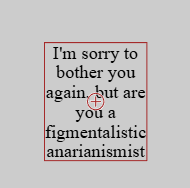
The reason why your second label looks like it is outside the outline is that the outline was made before applying the labelHeight. So use B.outline() after applying the labelHeight. An outline() is a snapshot in time.
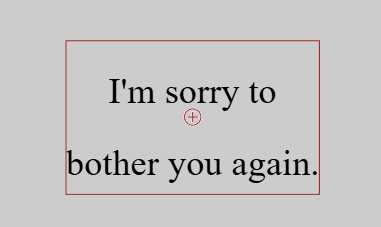
And the splitWords only works on a word if that single word is wider than the lableWidth.
Oh, and just a couple code tips...
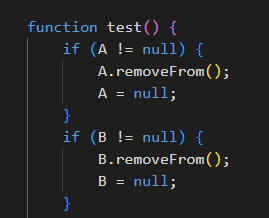
A.dispose() would be better than A.removeFrom(). If you are going to use it again, then use removeFrom(), if you want it gone out of memory, use dispose().
And .center(S) is not needed - just .center() will do that.
Cheers.
I just think the second one behaves better, because in the first one, the text suddenly becomes smaller once it reaches a certain width.
Sorry to interrupt you!
And thank you for your good tips!
<script type="module">

    import zim from "https://zimjs.org/cdn/019/zim";

    new Frame(FULL, null, null, light, dark, ready);

    function ready() {
        let A; let B; let C;

        function test() {
            if (A != null) {
                A.removeFrom();
                A = null;
            }
            if (B != null) {
                B.removeFrom();
                B = null;
            }

            let variableText = "こんにちは。明けましておめでとうございます。こんにちは。明けましておめでとうございます。こんにちは。明けましておめでとうございます。"

            A = new Label({
                text: variableText,
                labelWidth:  W * 0.8,
                labelHeight: 300,
                align: "center",
                valign: "middle",
                splitWords: true,
                font: "Yusei Magic",
            }).center(S).mov(0, -250);

            A.lineHeight = A.size * 1.25

            B = generateFittedText({
                text: variableText,
                maxWidth: W * 0.8,
                maxHeight: 300,
                textAlign: "center",
                splitByChar: true,
                fontName: "Yusei Magic",
                lineHeightRatio: 1.5
            }).center(S).mov(0, 250);

        }

        test()

        F.on("resize", () => {
            test()
        });

        function generateFittedText({
            text = "Text",
            maxWidth = 600,
            maxHeight = 600,
            fontName,
            color,
            lineHeightRatio = 1.25,
            textAlign = "center",
            splitByChar = true, // Set to false for English (word wrap), true for CJK (char wrap)
            maxFontSize = 80,
            minFontSize = 10
        }) {

            // Initialize the Zim Label
            const label = new Label({
                text: "",
                size: maxFontSize,
                font: fontName,
                color: color,
                align: textAlign,
                valign: "middle"
            });

            // Access the underlying CreateJS Text object for precise alignment
            const internalText = label.label;
            internalText.textAlign = textAlign;
            internalText.textBaseline = "middle";

            // Invisible text object used purely for measuring width
            const measureTool = new createjs.Text("", "", color);

            /**
             * wrapByChar: Wraps text character by character (Good for CJK or breaking long strings)
             */
            function wrapByChar(measureObj, rawString, limitWidth) {
                const lines = [];
                let currentLine = "";

                for (let i = 0; i < rawString.length; i++) {
                    const ch = rawString[i];
                    measureObj.text = currentLine + ch;

                    if (currentLine !== "" && measureObj.getMeasuredWidth() > limitWidth) {
                        lines.push(currentLine);
                        currentLine = ch;
                    } else {
                        currentLine += ch;
                    }
                }
                if (currentLine !== "") lines.push(currentLine);
                return lines;
            }

            /**
             * wrapByWord: Wraps text by words (Good for English/Latin languages)
             * Falls back to wrapByChar if a single word is wider than the container.
             */
            function wrapByWord(measureObj, rawString, limitWidth) {
                // Split by words, keeping trailing spaces
                const tokens = rawString.match(/\S+\s*/g) || [""];
                const lines = [];
                let currentLine = "";

                for (const tokenRaw of tokens) {
                    const token = tokenRaw;
                    measureObj.text = currentLine + token;

                    // Check if adding the next token exceeds width
                    if (currentLine !== "" && measureObj.getMeasuredWidth() > limitWidth) {
                        // Push the current line (remove trailing whitespace)
                        lines.push(currentLine.replace(/\s+$/g, ""));

                        // Handle the next token (remove leading whitespace for the new line)
                        let nextToken = token.replace(/^\s+/g, "");
                        measureObj.text = nextToken;

                        // Edge Case: If the single word is still too wide for the box
                        if (nextToken !== "" && measureObj.getMeasuredWidth() > limitWidth) {
                            // Force split the long word by character
                            const charLines = wrapByChar(measureObj, nextToken, limitWidth);
                            if (charLines.length > 1) {
                                lines.push(...charLines.slice(0, -1));
                                currentLine = charLines[charLines.length - 1] || "";
                            } else {
                                currentLine = charLines[0] || "";
                            }
                        } else {
                            currentLine = nextToken;
                        }
                    } else {
                        currentLine += token;
                    }
                }

                if (currentLine !== "") lines.push(currentLine.replace(/\s+$/g, ""));
                return lines;
            }

            /**
             * calculateLayout: Handles paragraph splitting (\n) and calls the appropriate wrapper
             */
            function calculateLayout(measureObj, rawString, limitWidth, rowHeight, isCharSplit) {
                const paragraphs = rawString.split('\n');
                let allLines = [];

                for (const paragraph of paragraphs) {
                    if (paragraph === "") {
                        allLines.push("");
                        continue;
                    }

                    const lines = isCharSplit
                        ? wrapByChar(measureObj, paragraph, limitWidth)
                        : wrapByWord(measureObj, paragraph, limitWidth);

                    allLines.push(...lines);
                }

                return {
                    wrappedString: allLines.join("\n"),
                    totalHeight: allLines.length * rowHeight
                };
            }

            // --- Main Loop: Try sizes from Max down to Min ---
            for (let size = maxFontSize; size >= minFontSize; size--) {
                const fontString = `${size}px ${fontName}`;
                const rowHeight = size * lineHeightRatio;

                measureTool.font = fontString;

                const result = calculateLayout(measureTool, text, maxWidth, rowHeight, splitByChar);

                // If it fits vertically, apply and return
                if (result.totalHeight <= maxHeight) {
                    internalText.font = fontString;
                    internalText.lineHeight = rowHeight;
                    label.text = result.wrappedString;

                    // Horizontal Alignment Positioning
                    if (textAlign === "center") {
                        label.x = maxWidth / 2;
                    } else if (textAlign === "right") {
                        label.x = maxWidth;
                    } else {
                        label.x = 0;
                    }

                    // Vertical Center Alignment
                    label.y = (maxHeight - result.totalHeight) / 2;

                    return label;
                }
            }

            // --- Fallback: If it still doesn't fit at minFontSize ---
            // Apply the minimum font size and force wrap
            internalText.font = `${minFontSize}px ${fontName}`;
            internalText.lineHeight = minFontSize * lineHeightRatio;

            measureTool.font = `${minFontSize}px ${fontName}`;
            const finalResult = calculateLayout(measureTool, text, maxWidth, minFontSize * lineHeightRatio, splitByChar);
            label.text = finalResult.wrappedString;

            if (textAlign === "center") {
                label.x = maxWidth / 2;
            } else if (textAlign === "right") {
                label.x = maxWidth;
            } else {
                label.x = 0;
            }

            // Top align if overflowing, or set to 0
            label.y = 0;

            return label;
        }
    }

</script>
<meta name="viewport" content="width=device-width, user-scalable=no" />
Will have a study, thanks.