The error
hitTestBounds(): please setBounds() on both objects
Gives no idea of what it is talking about. If some specific id or name can be added to the object it's pointing too, it can be easy to rectify the error.
The error
hitTestBounds(): please setBounds() on both objects
Gives no idea of what it is talking about. If some specific id or name can be added to the object it's pointing too, it can be easy to rectify the error.
Well typically the code is object1.hitTestBounds(object2). I am assuming one or both of those objects don't have bounds. Put them on the canvas somewhere usually works.
This error generally occurs when using DisplayObject instances without setBounds( ) method. I think especially wen ZIM manager is used. But I don't see anywhere, I missed using setBounds( ) still it's showing the error.
Anyway, I found the source of issue was using outline method on DisplayObject instance without first adding it to stage. However the setBounds errors were still confusing, as their association with outline method is not logical. And pointing to some very different section of the code.
Removing the outline method from instances, also removed the setBounds error
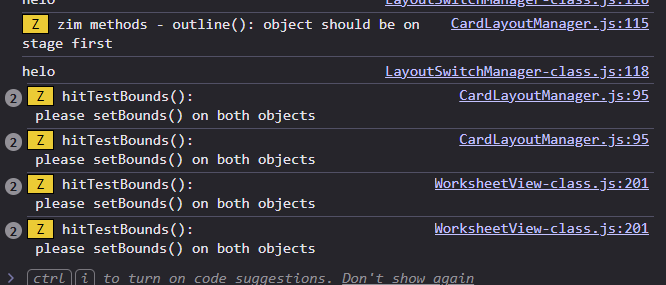
Hi Vishwas, so outline() was used on an object that was not on the stage? And it gave you the outline() message AND a hitTestBounds() message? Anyway, perhaps you can give us a small sample of the code that caused the problem and we can see if we can get better messaging happening.
Thanks! Thanks Pettis for the help too.
I am sending you project link to download via we transfer in the private message .
Once you run, you can see the console errors, starting with errors related to outline method. Followed by setbounds. If you remove outline method, error will go away
Did you get the link in your private message inbox? It's a wetransfer link, would expire after 2 days.